API Monetization
API Monetization with Amberflo
With the rise of data-as-a-service and the growing trend of exposing APIs as commercial products, many companies are unlocking new revenue streams by offering their APIs to developers and partners. As this model gains traction, API monetization becomes essential.
Amberflo makes it easy to track API usage, apply usage-based pricing, and deliver billing in a fair, transparent, and customer-friendly way.
Step 1: Instrument Your API for Usage Tracking
In this example, we’ll track usage for a sample API called AwesomeIntegrationApi, which processes records through integration jobs.
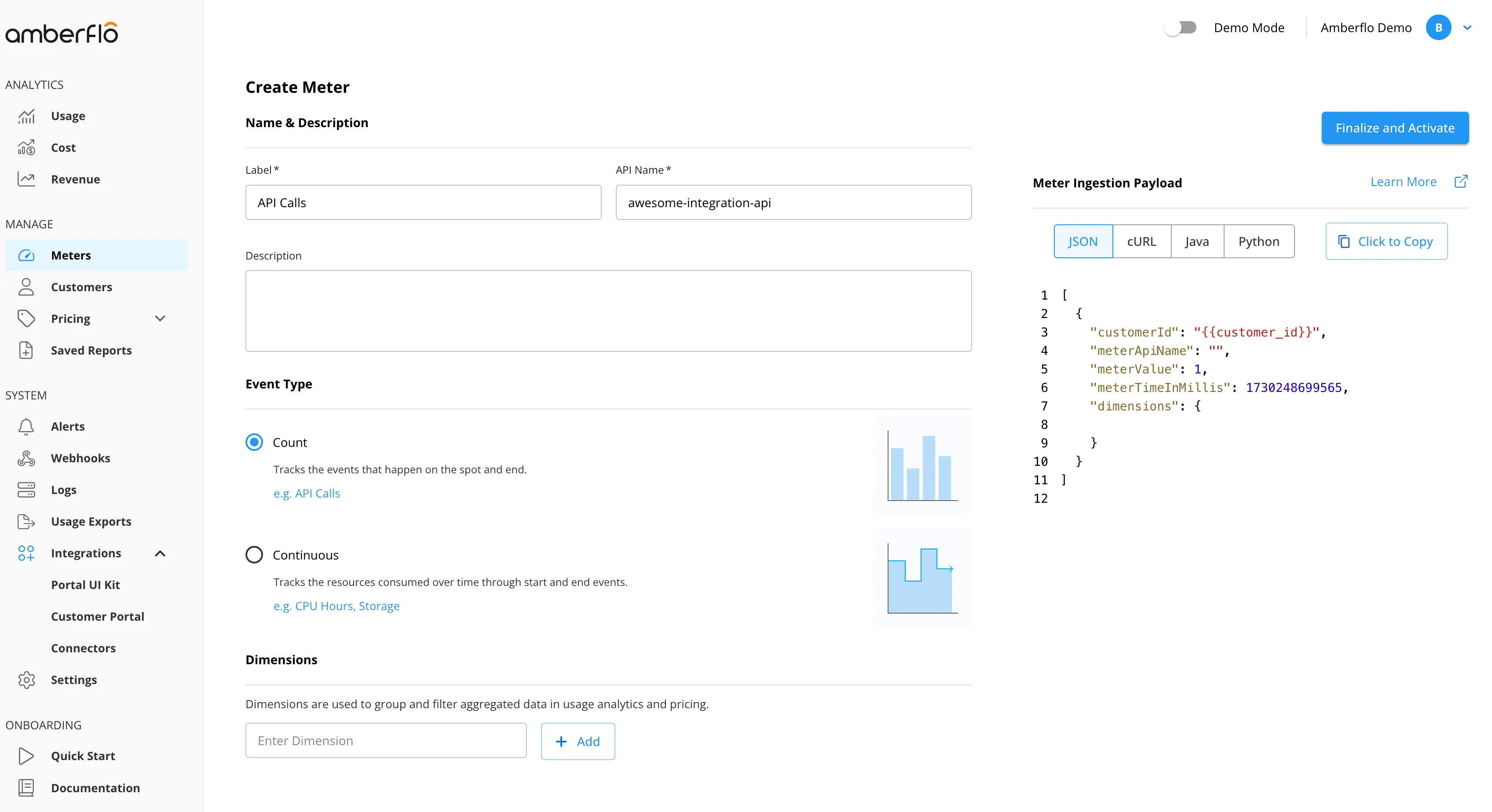
1. Create a Meter:
- Name: ApiCalls
- Event Type: Count
2. Instrument Your Code
- Update your API to send meter records for:
- Number of records processed
- Number of API calls received per job
- Each record must include:
- customerId
- meterTimeInMillis (event timestamp in epoch time milliseconds)
3. Use the Amberflo SDK
- The most efficient way to integrate metering is through an Amberflo SDK.
- Select the SDK for your preferred language and place it where events are generated.
- Example and code samples are available in the Amberflo Python SDK.
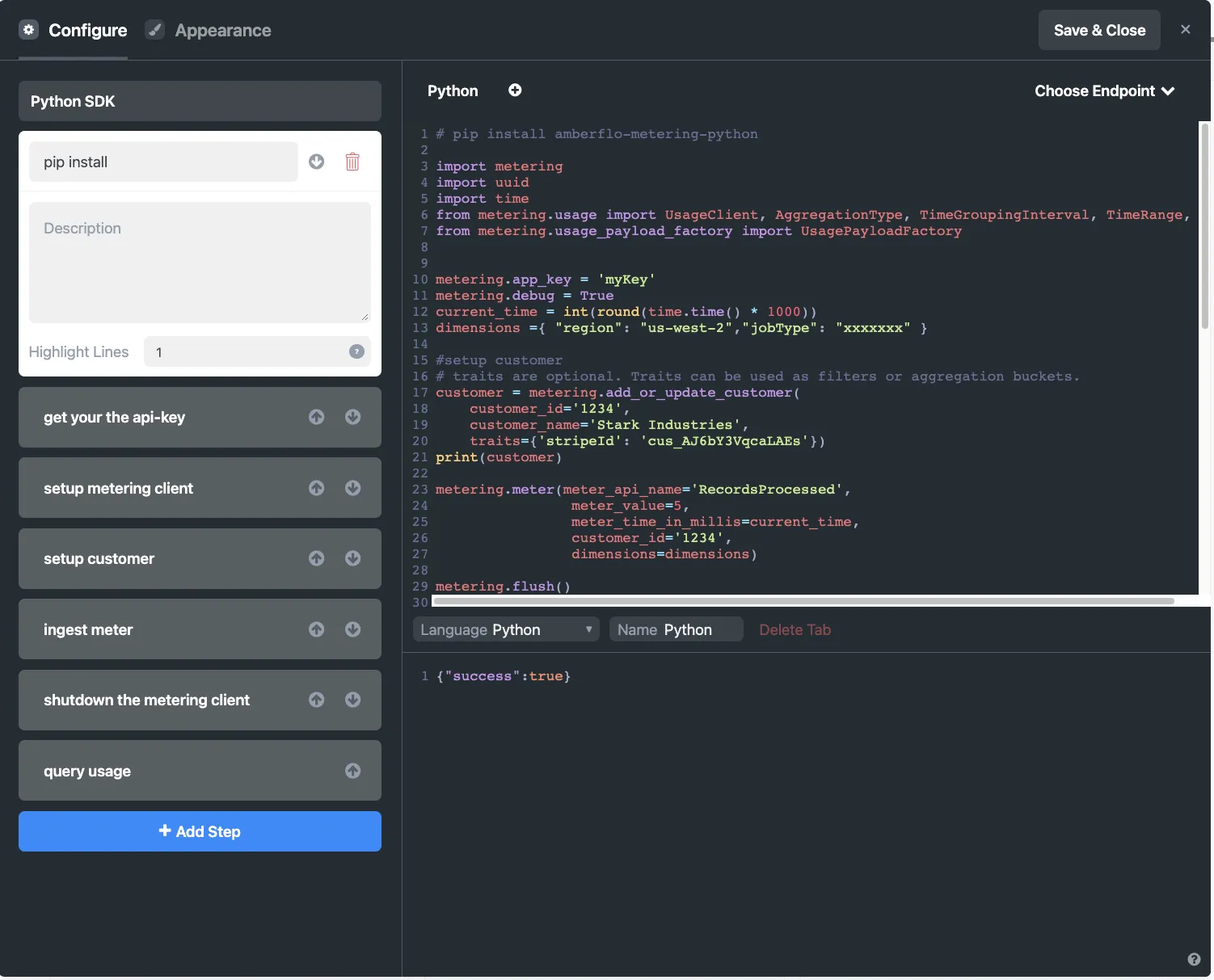
For a complete example, refer to the screenshots below or explore our Python SDK documentation.
# Set up virtual environment and install SDK
#
#   $ python3 -m virtualenv venv
#   $ . venv/bin/activate
# $ pip install amberflo-metering-python# Set up virtual environment and install SDK
#
# $ python3 -m virtualenv venv
# $ . venv/bin/activate
# $ pip install amberflo-metering-python
import os
# Sign up for free at https://ui.amberflo.io/ to get an API key
API_KEY = os.environ["AMBERFLO_API_KEY"]# Set up virtual environment and install SDK
#
# $ python3 -m virtualenv venv
# $ . venv/bin/activate
# $ pip install amberflo-metering-python
import os
# Sign up for free at https://ui.amberflo.io/ to get an API key
API_KEY = os.environ["AMBERFLO_API_KEY"]
# Set up customer API client and create a customer
from metering.customer import CustomerApiClient, create_customer_payload
customer_api = CustomerApiClient(os.environ.get("API_KEY"))# Set up virtual environment and install SDK
#
# $ python3 -m virtualenv venv
# $ . venv/bin/activate
# $ pip install amberflo-metering-python
import os
# Sign up for free at https://ui.amberflo.io/ to get an API key
API_KEY = os.environ["AMBERFLO_API_KEY"]
# Set up customer API client and create a customer
from metering.customer import CustomerApiClient, create_customer_payload
customer_api = CustomerApiClient(os.environ.get("API_KEY"))
message = create_customer_payload(
customer_id="customer-123",
customer_name="Customer 123",
# email is optional
customer_email="[email protected]",
# traits are optional. They can be used as filters or aggregation buckets
traits={
"region": "us-east-1",
},
)
customer = customer_api.add_or_update(message)# Set up virtual environment and install SDK
#
# $ python3 -m virtualenv venv
# $ . venv/bin/activate
# $ pip install amberflo-metering-python
import os
# Sign up for free at https://ui.amberflo.io/ to get an API key
API_KEY = os.environ["AMBERFLO_API_KEY"]
# Set up customer API client and create a customer
from metering.customer import CustomerApiClient, create_customer_payload
customer_api = CustomerApiClient(os.environ.get("API_KEY"))
message = create_customer_payload(
customer_id="customer-123",
customer_name="Customer 123",
# email is optional
customer_email="[email protected]",
# traits are optional. They can be used as filters or aggregation buckets
traits={
"region": "us-east-1",
},
)
customer = customer_api.add_or_update(message)
# Set up ingest API client and ingest a meter
from time import time
from metering.ingest import create_ingest_client
ingest_api = create_ingest_client(api_key=API_KEY)# Set up virtual environment and install SDK
#
# $ python3 -m virtualenv venv
# $ . venv/bin/activate
# $ pip install amberflo-metering-python
import os
# Sign up for free at https://ui.amberflo.io/ to get an API key
API_KEY = os.environ["AMBERFLO_API_KEY"]
# Set up customer API client and create a customer
from metering.customer import CustomerApiClient, create_customer_payload
customer_api = CustomerApiClient(os.environ.get("API_KEY"))
message = create_customer_payload(
customer_id="customer-123",
customer_name="Customer 123",
# email is optional
customer_email="[email protected]",
# traits are optional. They can be used as filters or aggregation buckets
traits={
"region": "us-east-1",
},
)
customer = customer_api.add_or_update(message)
# Set up ingest API client and ingest a meter
from time import time
from metering.ingest import create_ingest_client
ingest_api = create_ingest_client(api_key=API_KEY)
ingest_api.meter(
meter_api_name="api-calls",
meter_value=1,
meter_time_in_millis=int(time() * 1000),
customer_id=customer["customerId"],
)# Set up virtual environment and install SDK
#
# $ python3 -m virtualenv venv
# $ . venv/bin/activate
# $ pip install amberflo-metering-python
import os
# Sign up for free at https://ui.amberflo.io/ to get an API key
API_KEY = os.environ["AMBERFLO_API_KEY"]
# Set up customer API client and create a customer
from metering.customer import CustomerApiClient, create_customer_payload
customer_api = CustomerApiClient(os.environ.get("API_KEY"))
message = create_customer_payload(
customer_id="customer-123",
customer_name="Customer 123",
# email is optional
customer_email="[email protected]",
# traits are optional. They can be used as filters or aggregation buckets
traits={
"region": "us-east-1",
},
)
customer = customer_api.add_or_update(message)
# Set up ingest API client and ingest a meter
from time import time
from metering.ingest import create_ingest_client
ingest_api = create_ingest_client(api_key=API_KEY)
ingest_api.meter(
meter_api_name="api-calls",
meter_value=1,
meter_time_in_millis=int(time() * 1000),
customer_id=customer["customerId"],
)
# Shut down ingest API client
ingest_api.shutdown()# Set up virtual environment and install SDK
#
# $ python3 -m virtualenv venv
# $ . venv/bin/activate
# $ pip install amberflo-metering-python
import os
# Sign up for free at https://ui.amberflo.io/ to get an API key
API_KEY = os.environ["AMBERFLO_API_KEY"]
# Set up customer API client and create a customer
from metering.customer import CustomerApiClient, create_customer_payload
customer_api = CustomerApiClient(os.environ.get("API_KEY"))
message = create_customer_payload(
customer_id="customer-123",
customer_name="Customer 123",
# email is optional
customer_email="[email protected]",
# traits are optional. They can be used as filters or aggregation buckets
traits={
"region": "us-east-1",
},
)
customer = customer_api.add_or_update(message)
# Set up ingest API client and ingest a meter
from time import time
from metering.ingest import create_ingest_client
ingest_api = create_ingest_client(api_key=API_KEY)
ingest_api.meter(
meter_api_name="api-calls",
meter_value=1,
meter_time_in_millis=int(time() * 1000),
customer_id=customer["customerId"],
)
# Shut down ingest API client
ingest_api.shutdown()
# Setup usage API client and get a usage report
from metering.usage import (AggregationType, Take, TimeGroupingInterval,
TimeRange, UsageApiClient, create_usage_query)
usage_api = UsageApiClient(os.environ.get("API_KEY"))# Set up virtual environment and install SDK
#
# $ python3 -m virtualenv venv
# $ . venv/bin/activate
# $ pip install amberflo-metering-python
import os
# Sign up for free at https://ui.amberflo.io/ to get an API key
API_KEY = os.environ["AMBERFLO_API_KEY"]
# Set up customer API client and create a customer
from metering.customer import CustomerApiClient, create_customer_payload
customer_api = CustomerApiClient(os.environ.get("API_KEY"))
message = create_customer_payload(
customer_id="customer-123",
customer_name="Customer 123",
# email is optional
customer_email="[email protected]",
# traits are optional. They can be used as filters or aggregation buckets
traits={
"region": "us-east-1",
},
)
customer = customer_api.add_or_update(message)
# Set up ingest API client and ingest a meter
from time import time
from metering.ingest import create_ingest_client
ingest_api = create_ingest_client(api_key=API_KEY)
ingest_api.meter(
meter_api_name="api-calls",
meter_value=1,
meter_time_in_millis=int(time() * 1000),
customer_id=customer["customerId"],
)
# Shut down ingest API client
ingest_api.shutdown()
# Setup usage API client and get a usage report
from metering.usage import (AggregationType, Take, TimeGroupingInterval,
TimeRange, UsageApiClient, create_usage_query)
usage_api = UsageApiClient(os.environ.get("API_KEY"))
since_two_days_ago = TimeRange(int(time()) - 60 * 60 * 24 * 2)
query = create_usage_query(
meter_api_name="api-calls",
aggregation=AggregationType.SUM,
time_grouping_interval=TimeGroupingInterval.DAY,
time_range=since_two_days_ago,
group_by=["customerId"],
usage_filter={"customerId": ["customer-123"]},
take=Take(limit=10, is_ascending=False),
)
report = usage_api.get(query)
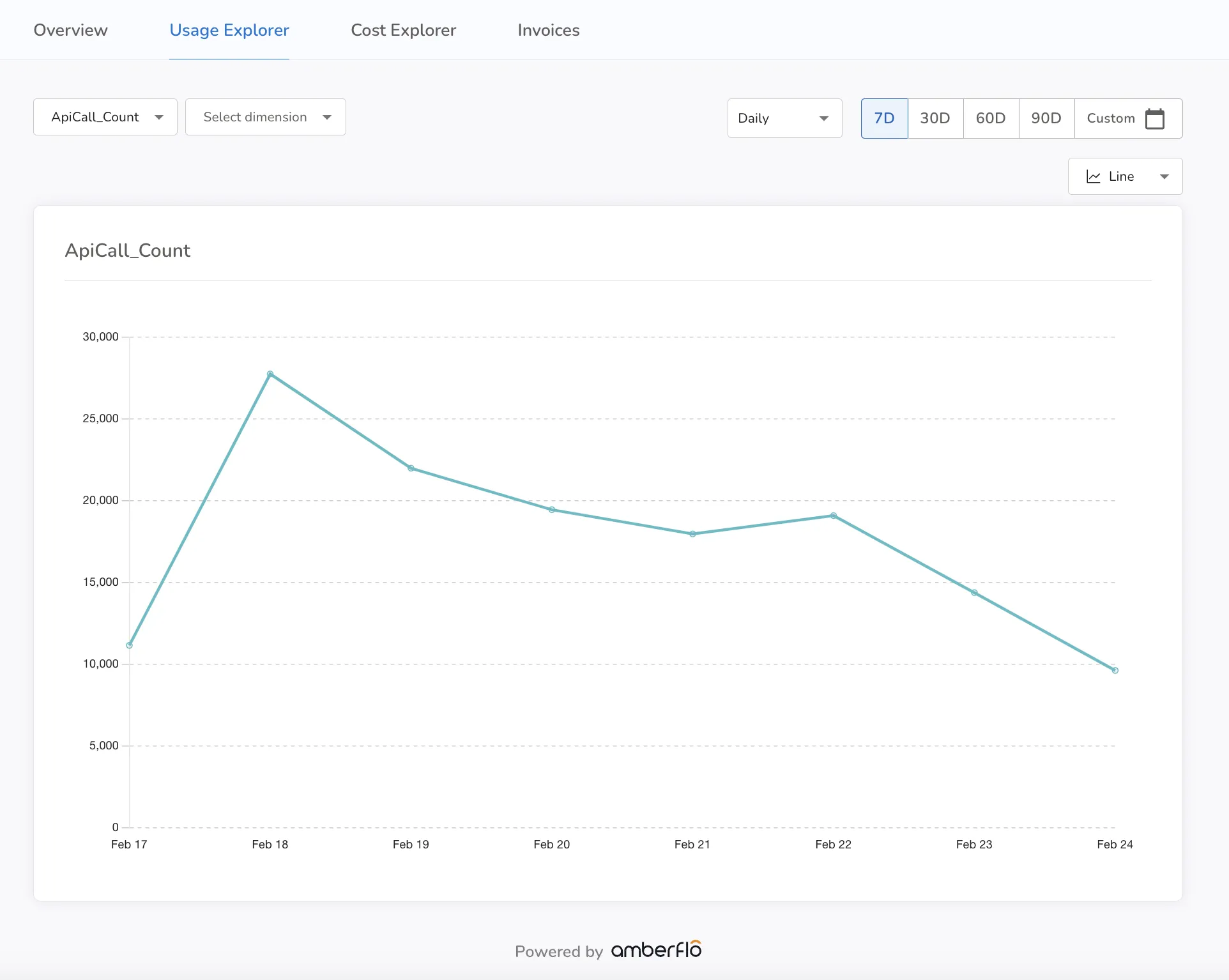
Step 2: View and Share Real-Time Usage
Amberflo allows you to view detailed usage data per customer in real time. You can expose this data to customers in two ways:
- Use the Amberflo Customer Portal, hosted by Amberflo.
- Embed UI components directly into your own application using our React-based portal components.
This transparency improves customer trust and supports self-service billing review.
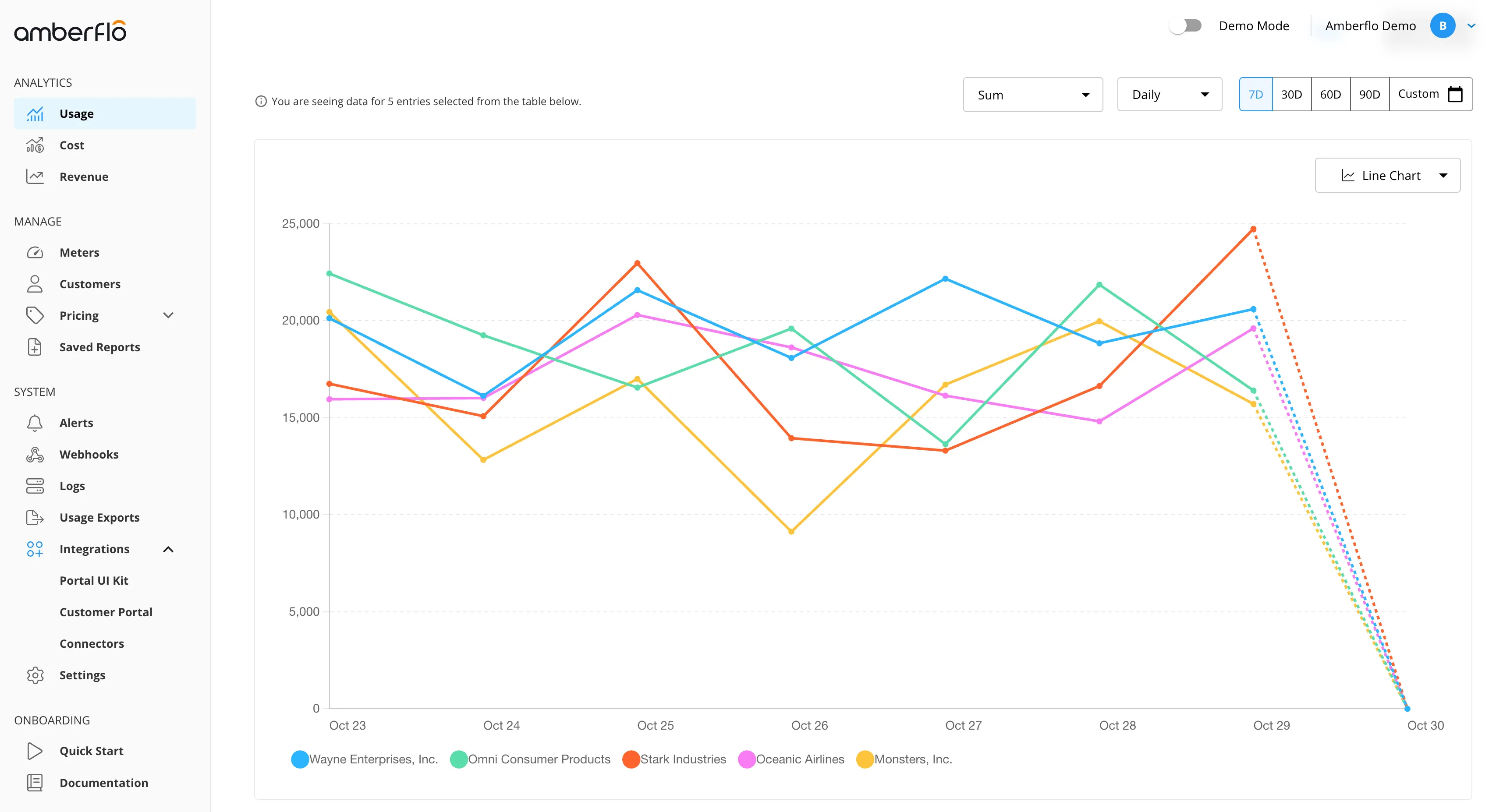
An example of the Customer Portal view:
Step 3: Build a Usage-Based Pricing Plan
Now that usage is being metered, you can monetize it by creating a pricing plan.
1. Create a Pricing Plan
- Name the plan (e.g. AwesomeIntegrationApi)
2. Choose a Rate Model
- Amberflo supports multiple rate models (per unit, block, volume, tiered, etc.).
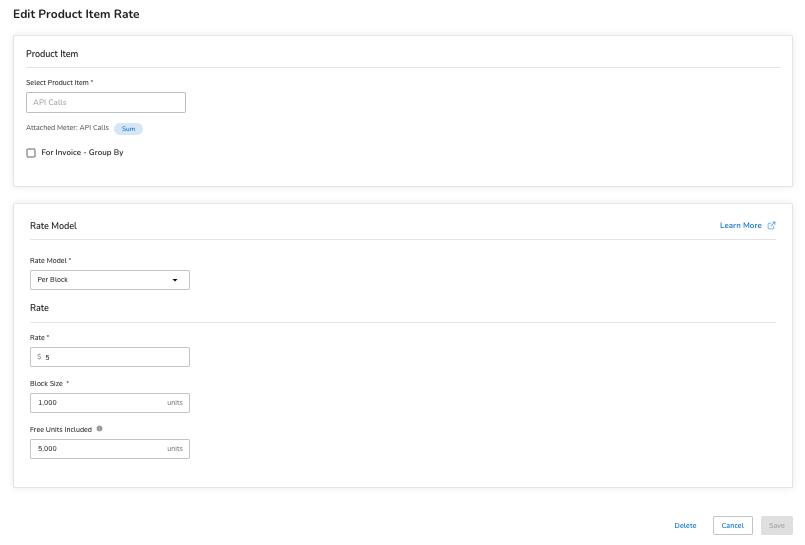
- In this example, choose Block Pricing:
- Rate: $5 per 1,000 API calls
- Free tier: 5,000 API calls per month
- Customers are only charged starting with the 5,001st call.
3. Activate the Plan
- Enable the plan using the toggle in the plan view.
- Assign the plan to customers manually or automatically during sign-up using your preferred workflow.
Once assigned, Amberflo will begin tracking usage and generating a real-time metered invoice that stays continuously updated throughout the billing period.