AWS CloudWatch
Meter Ingestion via serverless agent for AWS CloudWatch
If you’d like to try Amberflo without modifying your existing code or importing new libraries, you can use our Serverless Agent for AWS CloudWatch to automatically extract meter data from your CloudWatch logs.
How It Works
- Configure the Serverless Agent Connect Amberflo's serverless agent to your AWS CloudWatch environment (within your AWS VPC).
- Log Meter Records with Tags Log your meter events in CloudWatch, including a special Amberflo tag. This tag tells the agent which log entries represent meter data.
- Automatic Extraction and Ingestion The agent scans the logs, identifies entries with the Amberflo tag, and ingests them as meter events into Amberflo—automatically.
Example Project
We provide a demo project that shows:
- A REST API powered by AWS Lambda
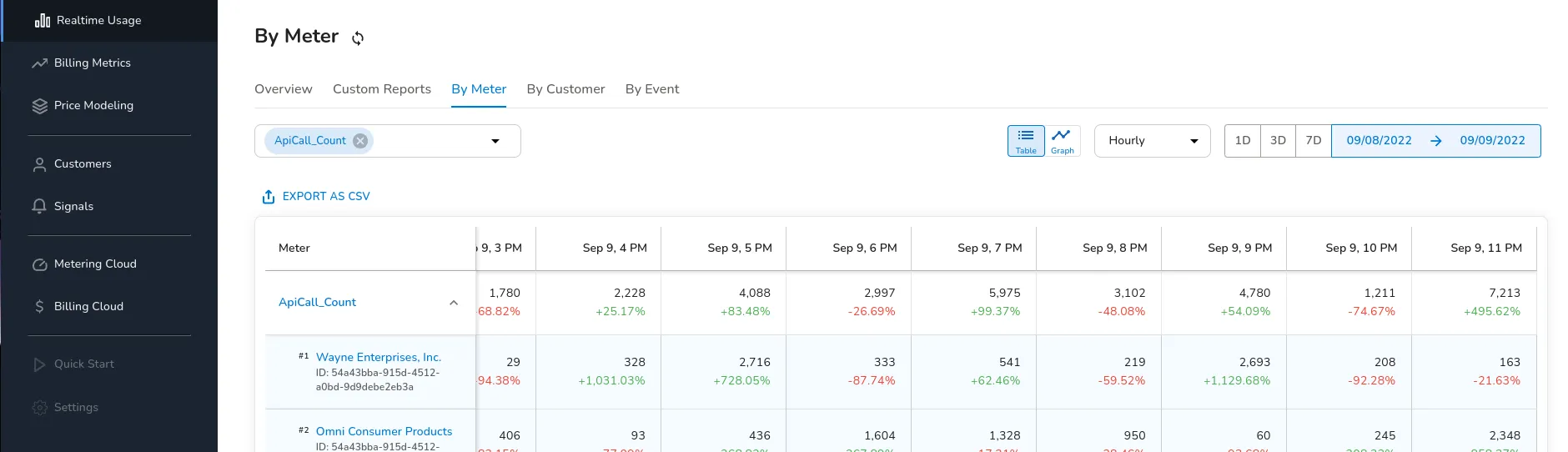
- How to log and meter the number of API calls using CloudWatch
- Other approaches for metering Lambda functions
How does it work?
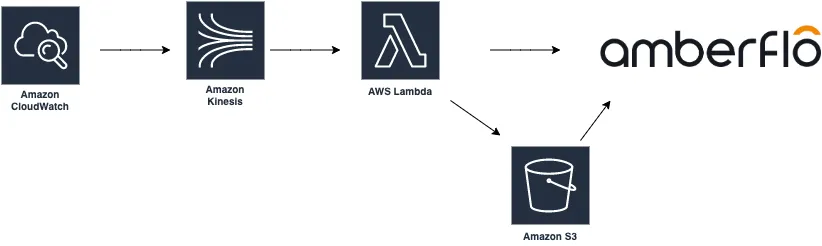
Here is a step-by-step overview of how the CloudWatch agent operates:
- Your code logs meter records Your application logs meter records to a CloudWatch log group (this is the default behavior for AWS Lambda functions).
- Kinesis Stream collects the logs A Kinesis Stream captures the relevant log entries via a CloudWatch Subscription Filter.
- If you have multiple log groups, you can route them all to the same Kinesis Stream.
- Lambda agent processes the stream A Lambda function (the agent) consumes log entries from the Kinesis Stream, extracts the meter records, and sends them to Amberflo for ingestion.
Note: In the example setup, the filter pattern used is: meter_record_for_stream
You can use the code below (NodeJS) for the Kinesis Stream consumer lambda:
'use strict';

const crypto = require('crypto');
const zlib = require('zlib');
const AWS = require('aws-sdk');

const bucketName = process.env.INGEST_BUCKET_NAME;
const accessKeyId = process.env.ACCESS_KEY;
const secretAccessKey = process.env.SECRET_KEY;

const s3 = new AWS.S3({
    region: 'us-west-2',
    accessKeyId,
    secretAccessKey,
});

const prefix = 'meter_record_for_stream';

exports.handler = async (event) => {
    const records = event
        .Records
        .map(r => r.kinesis.data)
        .map(d =>
            // Decompress and parse the CloudWatch payload
            JSON.parse(zlib.gunzipSync(Buffer.from(d, 'base64')).toString())
        )
        .filter(m => m.messageType !== 'CONTROL_MESSAGE')
        .map(p => p
            .logEvents
            .map(x => x.message)
            .map(m => {
                const i = m.indexOf(prefix);
                if (i < 0) return;  // get only messages containing meter records
                return JSON.parse(m.slice(i + prefix.length + 1));
            })
            .filter(x => x)
        ).flat();

    await ingest(records);
};

async function ingest(records) {
    const date = new Date().toISOString().slice(0, 10);
    const key = `ingest/records/${date}/${crypto.randomBytes(20).toString('hex')}.json`;

    const params = {
        Bucket: bucketName,
        Key: key,
        Body: JSON.stringify(records),
    };
    return s3.putObject(params).promise();
}
This code will take log entries like the one below and ingest them in batches through your Amberflo-provided S3 bucket.
INFO meter_record_for_stream {
    "meterApiName": "api-calls",
    "customerId": "70f1dd87-6978-4d96-a934-5a83b63cdeb1",
    "meterTimeInMillis": 1663094105062,
    "meterValue": 1,
    "uniqueId": "c91b8860-3392-11ed-a17b-bfa2e899d2c9",
    "dimensions": {
        "method": "GET"
        "endpoint": "meter-example"
    }
}
📘 Ingest record format
If you log the meter records in a different format, you can modify the code above to marshal the records into the Amberflo ingest format.