Segment.io
You can ingest events into Amberflo using Segment.io. Integration details can be found here.
What You Can Do
With Segment's Amberflo Destination, you can:
- Ingest meter events using:
- track
- page
- screen
- Create customers in Amberflo using:
- identify
This integration provides a seamless way to bring your customer and usage data into Amberflo using Segment’s event tracking.
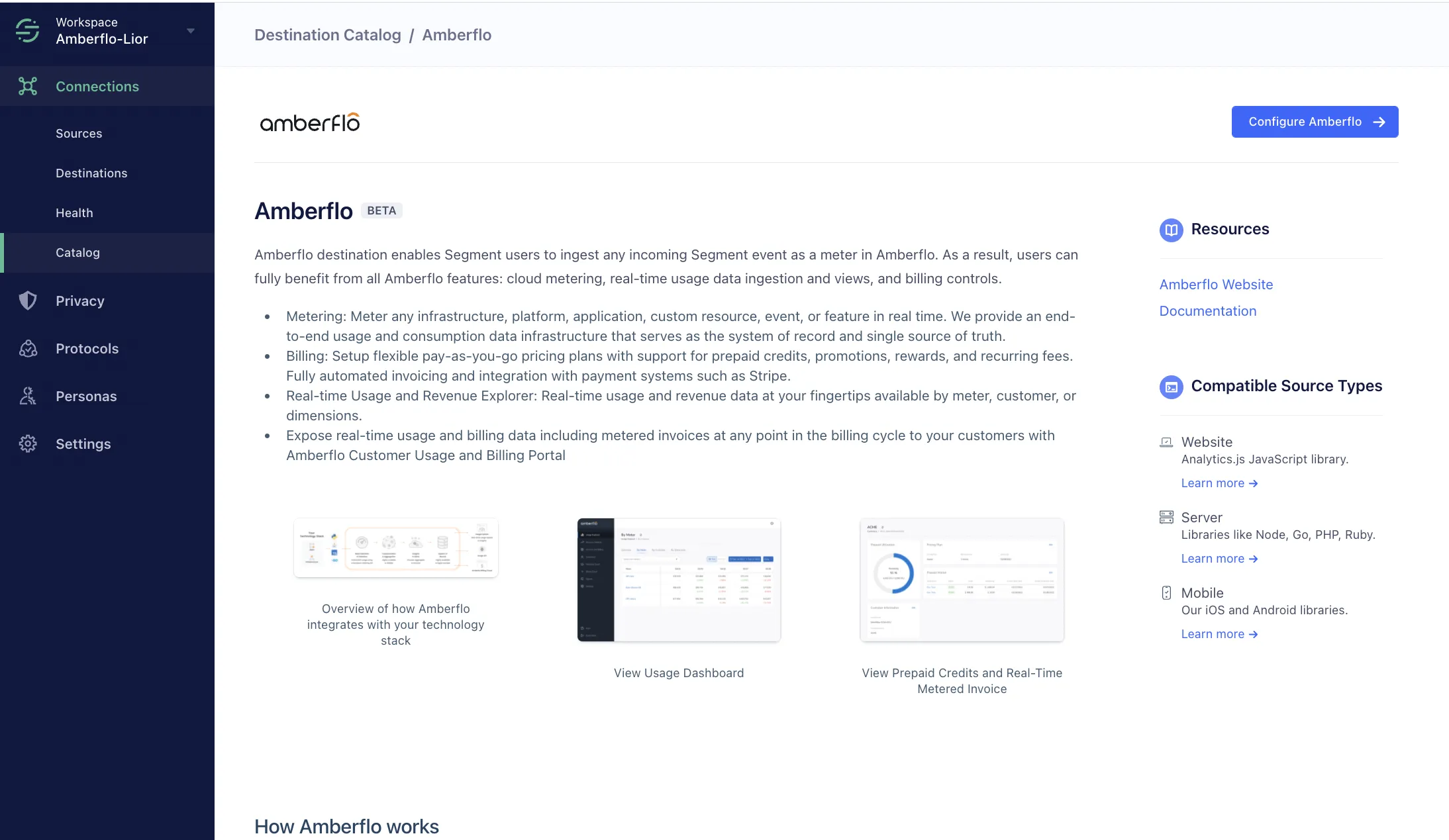
Getting Started
- From the
- Search for
- Choose which
- Go to the
- Enter the “API Key” in the
Supported methods
Page
Create a meter called page in Amberflo.
The page is ingested as meter with value 1.
analytics.page({
  userId: "some_user_id",
  name: "Home",
  properties: {
   	"title": "Welcome | Initech",
    "keywords": "paper,comedy",
    "search": "schrute farms",
    "referrer": "https://google.com",
    "path": "/home",
    "browser": "Chrome",
    "url": "https://segment.com"
  }
})
Mappings:
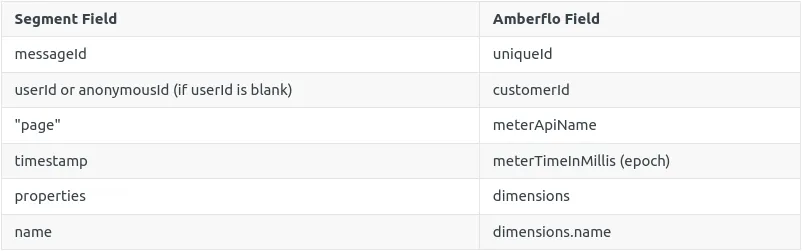
Amberflo webhook endpoint:
curl --request POST \
     --url https: //app.amberflo.io/ingest \
     --header 'Accept: application/json' \
     --header 'Content-Type: application/json' \
     --header 'x-api-key: YOUR_API_KEY' \
     --data '
{
    "uniqueId": "messageId",
    "customerId": "some_user_id",
    "meterApiName": "page",
    "meterValue": 1.0,
    "meterTimeInMillis": 1619445706909,
    "dimensions": {
        "name": "Home",
        "title": "Welcome _ Initech",
        "keywords": "paper,comedy",
        "search": "schrute farms",
        "referrer": "https:__google.com",
        "path": "_home",
        "browser": "Chrome",
        "url": "https:__segment.com"
    }
}
Screen
Create a meter called screen in Amberflo. The screen event is ingested as meter with value 1.
analytics.screen({
  userId: "some_user_id",
  name: "Home",
  properties: {
   	"title": "Welcome | Initech"
  }
})
Mappings:
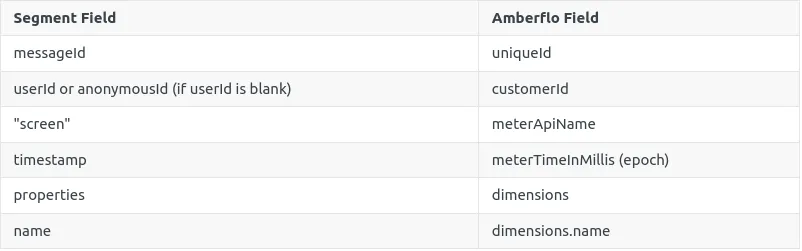
Amberflo webhook endpoint:
curl --request POST \
     --url https://app.amberflo.io/ingest \
     --header 'Accept: application/json' \
     --header 'Content-Type: application/json' \
     --header 'x-api-key: YOUR_API_KEY' \
     --data '
{
     "uniqueId": "messageId",
     "customerId": "segmentUserId",
     "meterApiName": "screen",
     "meterValue": 1.0,
     "meterTimeInMillis": 1619445706909,
     "dimensions": {
       "name": "Home",
       "title": "Welcome _ Initech"
     }
}
'
Identify
Identify creates a customer in Amberflo or updates if customer already exists. Segment's userId is required for a customer in Amberflo. If userId is not set, then the customer will not be created in Amberflo and the identify event will be discarded.
analytics.identify({
  userId: "some_user_id",
  traits: {
    "name": "John Doe",
    "email": "[email protected]",
    "plan": "premium",
    "logins": 5,
    "phone": "650-769-3240",
    "username": "marakasina",
    "website": "example.com",
    "avatar": "https://s3.amazonaws.com/uifaces/faces/twitter/scottkclark/128.jpg"
  }
})
Mappings:
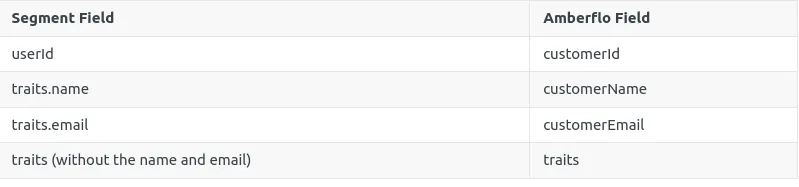
Amberflo webhook endpoint:
curl --request PUT \
     --url https://app.amberflo.io/customers \
     --header 'Accept: application/json' \
     --header 'Content-Type: application/json' \
     --header 'x-api-key: YOUR_API_KEY' \
     --data '
{
     "customerId": "XXXX-ZZZZZ",
     "customerName": "myCustomerName",
     "customerEmail" "[email protected]",
     "traits": {
        "plan": "premium",
        "logins": 5,
        "phone": "650-769-3240",
        "username": "marakasina",
        "website": "example.com",
        "avatar": "https:__s3.amazonaws.com_uifaces_faces_twitter_scottkclark_128.jpg"
    }
}
'
Track
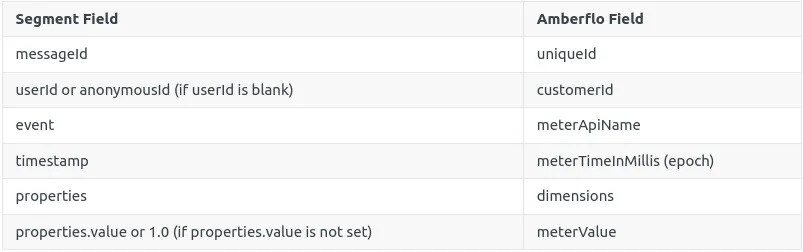
Create a meter in Amberflo for the track event in Segment. The Segment track event is ingested as a meter with value of properties.value, or 1 if the value is not set.
analytics.track({
  userId: "some_user_id",
  event: "ApiCalls",
  properties: {
    "value" : 2.0
   	"region": "us-west-2"
  }
})
Mappings:
Amberflo webhook endpoint:
curl --request POST \
     --url https://app.amberflo.io/ingest \
     --header 'Accept: application/json' \
     --header 'Content-Type: application/json' \
     --header 'x-api-key: YOUR_API_KEY' \
     --data '
{
     "uniqueId": "messageId",
     "customerId": "some_user_id",
     "meterApiName": "ApiCalls",
     "meterValue": 2.0,
     "meterTimeInMillis": 1619445706909,
     "dimensions": {
      	"region": "us-west-2"
     }
}
'